Artificial Academy 2: Mouse and Keyboard shortcuts
From Hgames Wiki
< Artificial Academy 2
Revision as of 09:24, 21 September 2025 by Ggy (talk | contribs) (Created page with "{{Artificial_Academy_2}} {| class="wikitable" style="text-align:center;" |- |colspan=2 style="text-align:center; background:#eee"|General |- | Interact ||{{key|Left-Click}} |...")
- Recent changes
- All pages
- Wiki tutorial
- Purge (this page)
all characters are at least 18
- No spoiler
- Game Description
- Mod and uncensor
- Free roam (no spoiler)
- Card editor (no spoiler)
- Mouse and Keyboard shortcuts
- How-to (Free roam)
- How-to (Modding)
| General | |
| Interact | Left-Click |
| Cancel/Go back | Right-Click |
| Cycle-select NPC | Mousewheel |
| Move, interact with selected NPC | Middleclick |
| Game menu (Settings, Load) |
F1 |
| Save (overwrite!) | F3 |
| Quit completely | Esc |
| Global speed | P |
| 3D during conversation | Space |
| Screenshot with HUD | F9 |
| Screenshot without HUD | F11 |
| 3D views | |
| Rotate | Left-Click and drag |
| Up/Down + In/Out | Right-Click and drag |
| Reset | R |
| H-scene | |
| PC | 0 |
| Penis | 4 |
| NPC | 5 |
| 3D objects | 8 |
| Speed | Mousewheel / A / S |
| Auto Speed | Middleclick |
| Focus head | Q |
| Focus chest | W |
| Focus groin | E |
| Lighting | Space |
| 3D views more | |
| Left | ← |
| Right | → |
| In | ↑ |
| out | ↓ |
| In (Field of view) | ; (semicolon) |
| Out (Field of view) | ] (or some keyboard \) |
| Clockwise | . |
| Counter-Clockwise | \ |
| Rotate (NumPad) | 4 / 6 / 8 / 2 |
| Reset Rotation (NumPad) | / / 5 |
| Left/Right + In/Out | Both Left-Click and Right-Click and drag |
| Up/Down | PageUp / PageDown |
- No way to revert Up/down (Right-Click and drag) yet
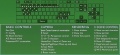
Hotkey map screenshot


